
New in rWeb v10.0: full CSS-based theming
Example of a re-themed rWeb, in Dark-Mode
Building upon existing white-label customizations like logo replacement, rWeb release 10.0 extends control to the full visual presentation of the interface across both Light and Dark modes.
This extends of our goal of helping clients spin up their own DDoS scrubbing infrastructure offering, with minimal time investment in custom configuration and training.
Why this matters
For years, rWeb has provided the tools to deliver a client-facing white-label portal experience, with visibility into traffic, attacks, and mitigation behavior, along with direct control and alerting.
From release 10.0 forward, rWeb can now be configured to graphically match your existing client-facing infrastructure tools and services.
Importantly, this can be accomplished quickly and efficiently, with minimal design overhead.
Some Possibilities
Below are a few examples showcasing how far rWeb can extend beyond its default appearance.
Our logo remains in place for these examples, along with the default rWeb labeling and version number. But remember, your logo and portal name convention can be customized.
Your clients/users can also choose their own individual preference between Light or Dark modes.
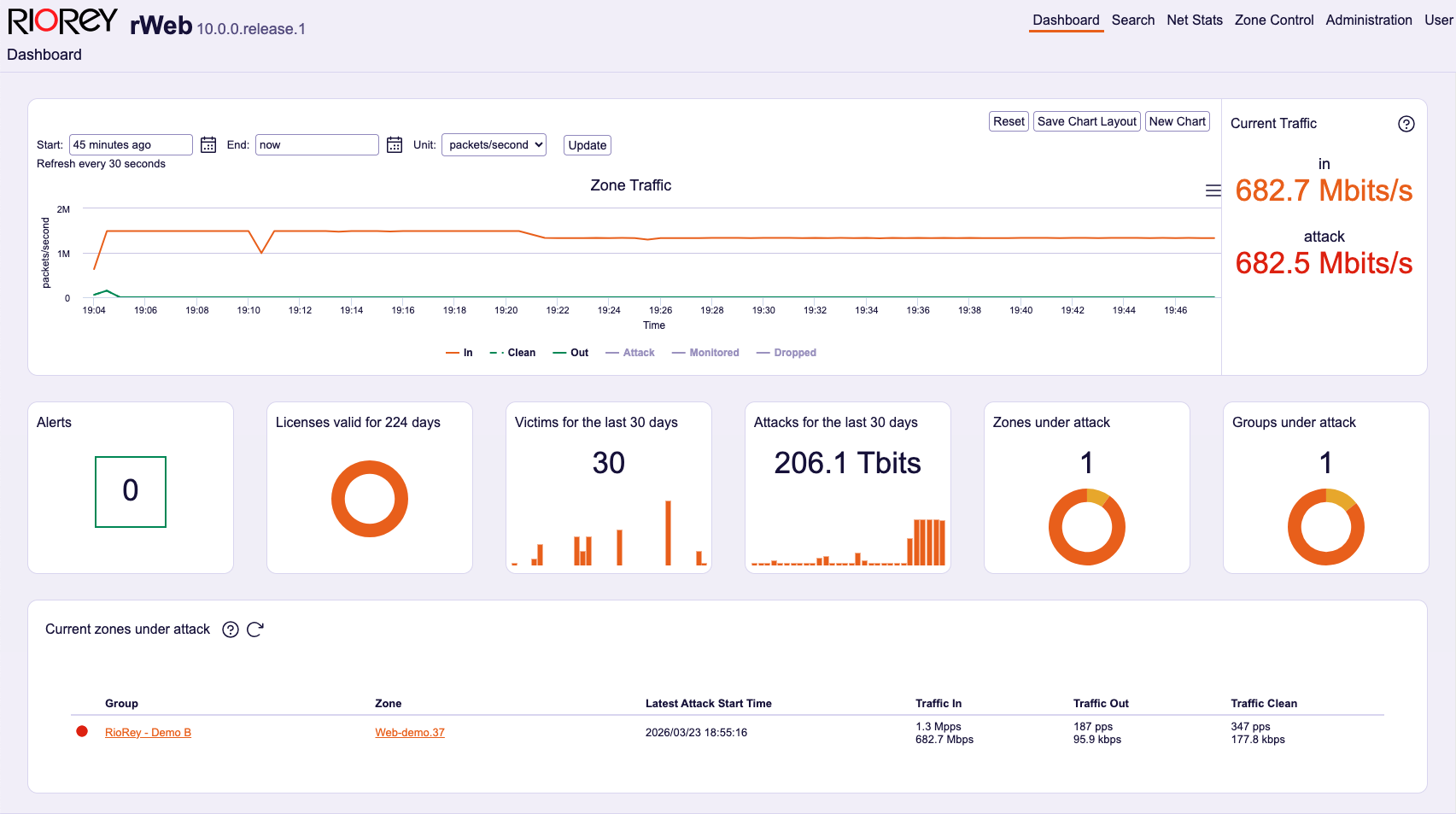
Main landing page of a re-themed rWeb, in Light-Mode
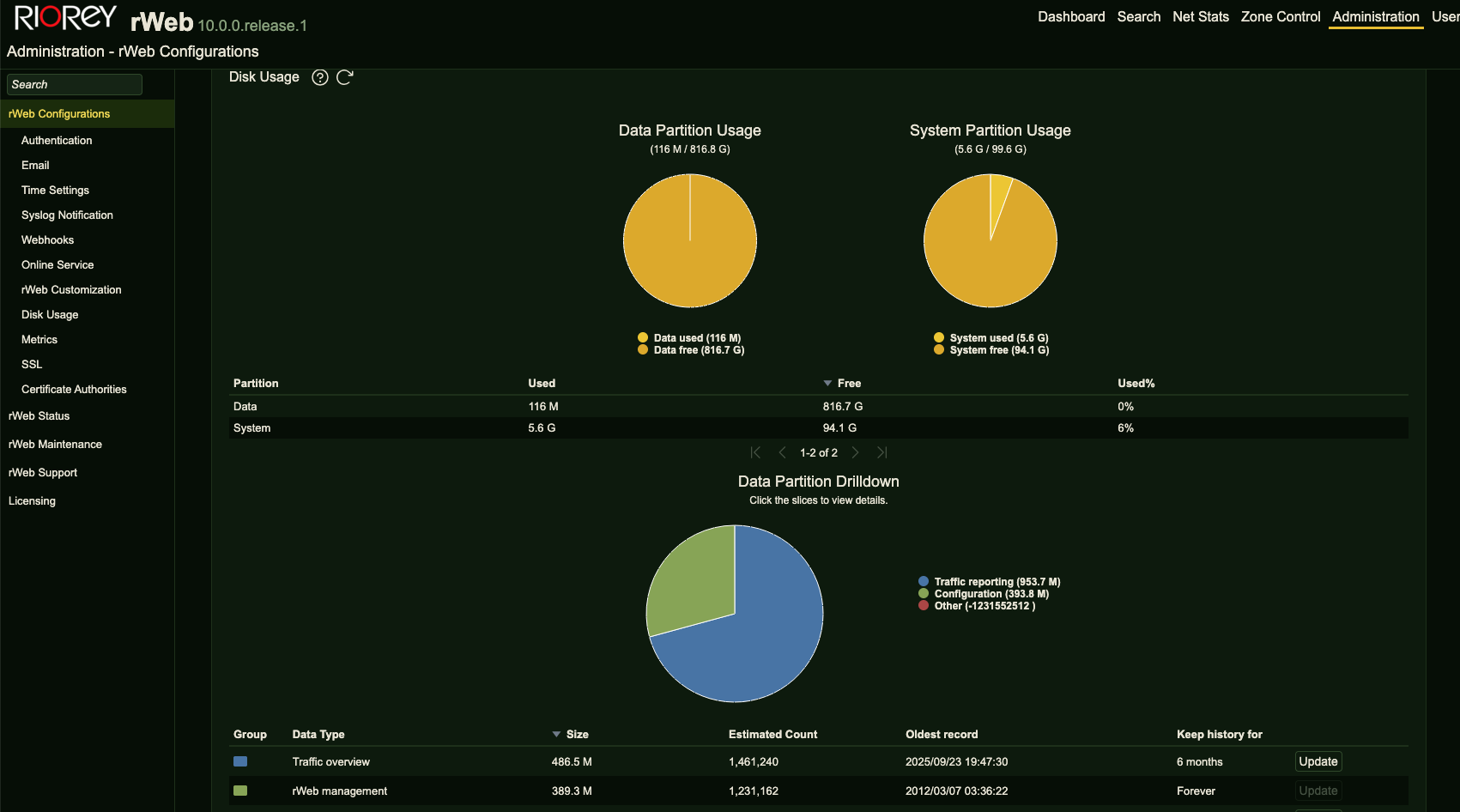
Config and resources tab of a re-themed rWeb, in Dark-Mode
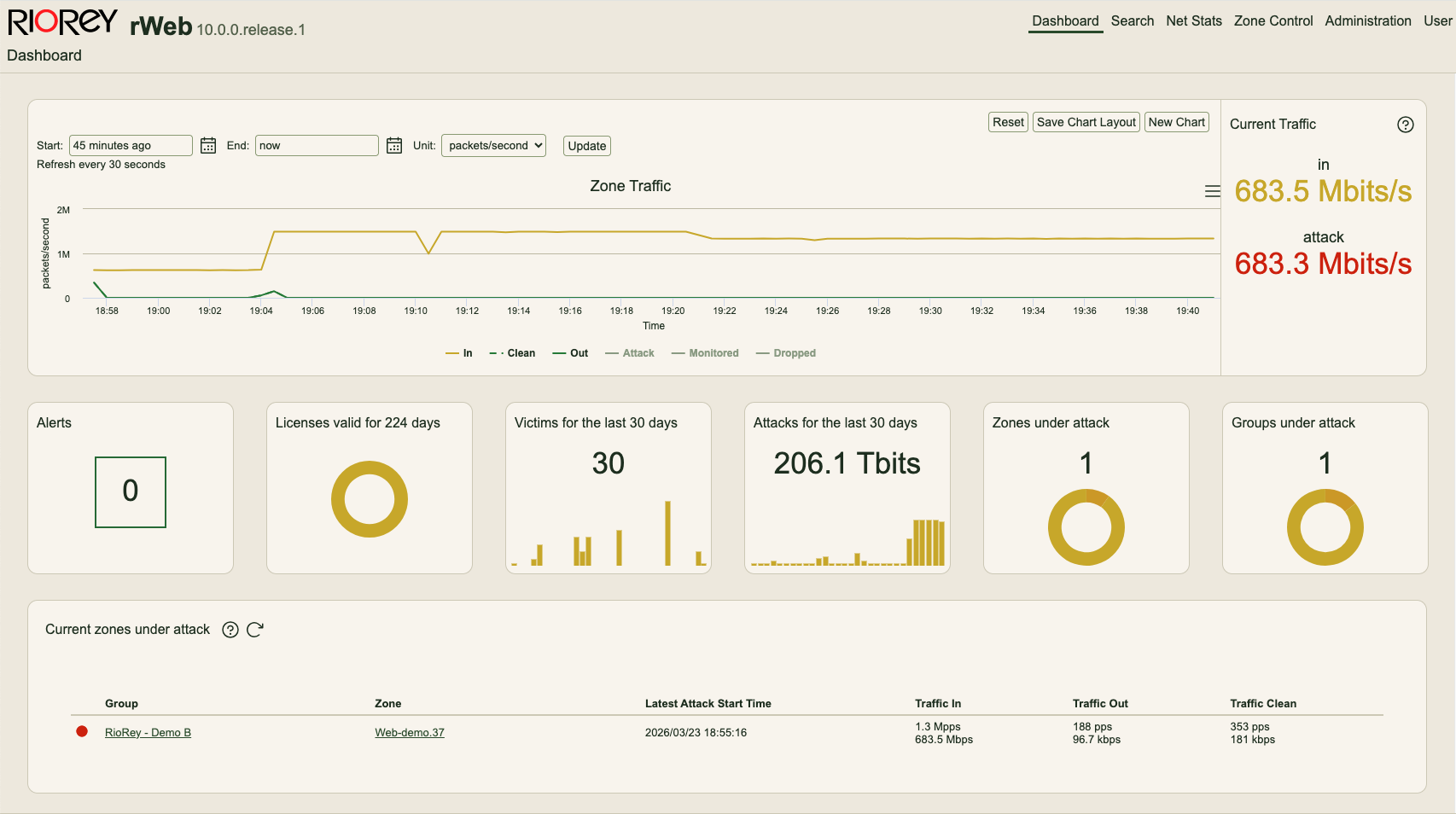
Main landing page of a re-themed rWeb, in Light-Mode
How to do this
5 minutes and the appropriate rWeb permissions are all you need.
In the top navigation of your rWeb, navigate to Administration → rWeb → rWebCustomization.
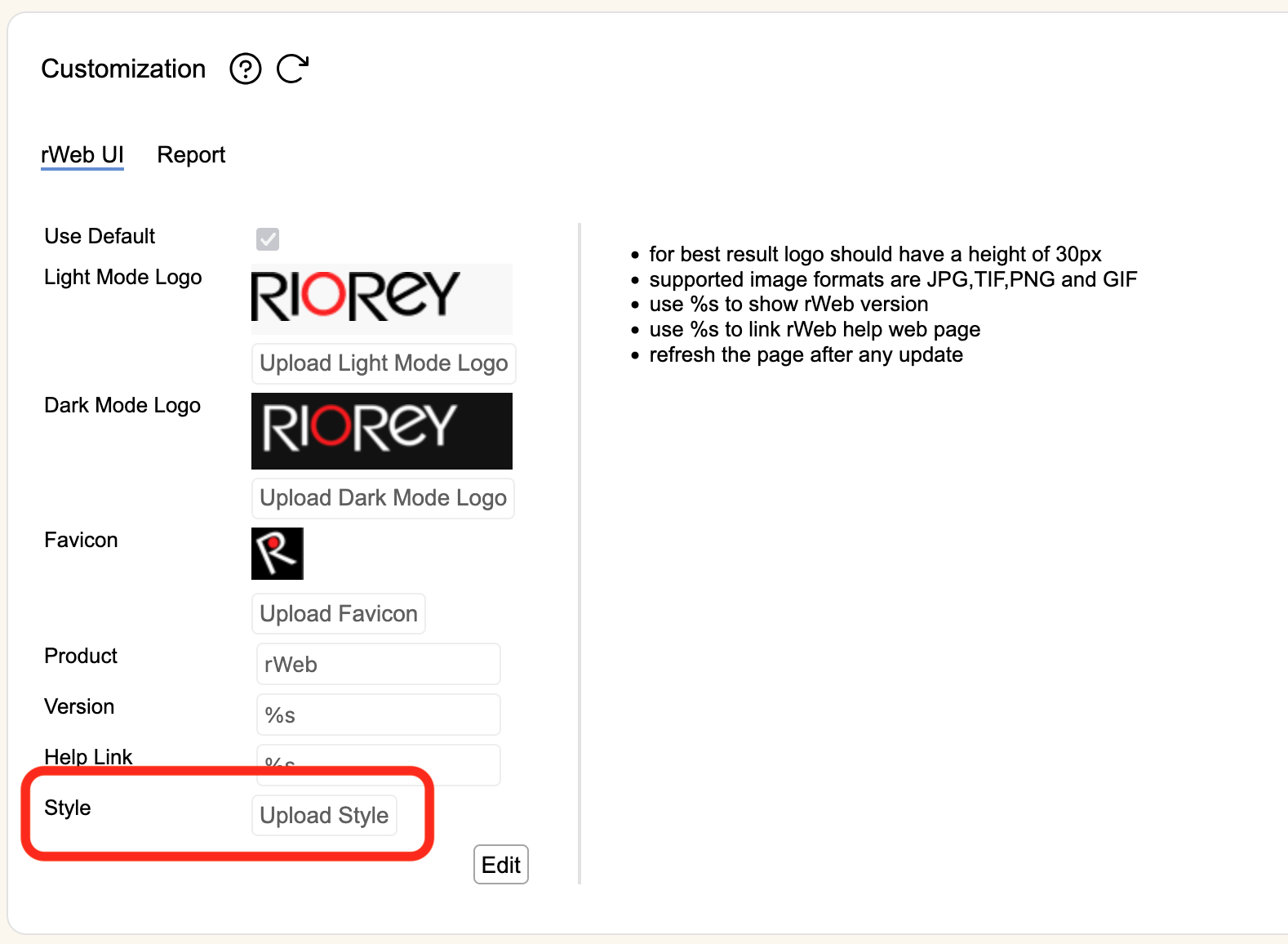
rWeb Customization Menu
Here you will find the fields to change your:
Logos
rWeb portal title, version etc
and now Style
This is where you may upload a custom CSS stylesheet (below for more detail).
After uploading a new CSS style sheet, be sure to Shift + Refresh your browser.
Reminder, to switch between viewing rWeb in Light or Dark mode
In the top navigation of your rWeb, navigate to User → Profile → Preference.
Example CSS
Below is a complete example stylesheet showing all available fields.
Download a file version here
/*
 * rWeb Custom Stylesheet
 * Theme: Light Grey — Corporate
 * Description: Based on Light Grey Subtle. Light mode updates bring in
 *              chart colors from Navy Gold (blue In line, green Clean/Out,
 *              yellow monitor accent, refined red LED), corporate red for
 *              links and nav active underline, and dark grey for selected
 *              sidebar states. Dark mode is Light Grey Subtle defaults with
 *              corporate red applied to links and the nav underline only.
 *
 * Compatible with rWeb custom stylesheet API (CSS variable overrides only).
 */

body {
    /* ── Text ── */
    --color-text: black;
    --color-text-disabled: var(--rr-gray-700);
    --color-text-selected: #1a1c22;
    --color-text-danger: var(--rr-red-600);
    --color-text-subtle: var(--rr-gray-700);
    --color-text-inverse: white;

    --color-link: #c0392b;

    /* ── Surfaces ── */
    --color-surface-sunken: #fafafa;
    --color-surface: white;
    --color-surface-raised: white;
    --color-surface-overlay: white;

    /* ── Borders ── */
    --color-border: #e5e7eb;
    --color-border-input: var(--rr-gray-400);
    --color-border-disabled: var(--rr-gray-100);
    --color-border-selected: #c0392b;
    --color-border-danger: var(--rr-red-600);
    --color-border-warning: var(--rr-orange-300);
    --color-border-success: #64e572;

    /* ── LED indicators ── */
    --color-led-red: #e74c3c;
    --color-led-yellow: #ffd900;
    --color-led-green: green;

    /* ── Accent backgrounds ── */
    --color-background-accent-subtle: #fafafa;

    /* ── Input backgrounds ── */
    --color-background-input: white;
    --color-background-input-hovered: var(--rr-gray-100);
    --color-background-input-pressed: var(--rr-gray-200);

    /* ── Neutral backgrounds ── */
    --color-background-neutral: rgb(from var(--rr-blue-800) r g b / 10%);
    --color-background-neutral-hovered: rgb(from var(--rr-blue-800) r g b / 15%);
    --color-background-neutral-pressed: rgb(from var(--rr-blue-800) r g b / 20%);
    --color-background-neutral-subtle: transparent;
    --color-background-neutral-subtle-hovered: #091E420F;
    --color-background-neutral-subtle-pressed: #091E4224;

    /* ── Selected state ── */
    --color-background-selected: #e8e9eb;
    --color-background-selected-hovered: #dcdee0;
    --color-background-selected-pressed: #d0d2d5;

    /* ── Brand bold ── */
    --color-background-brand-bold: var(--rr-blue-500);
    --color-background-brand-bold-hovered: var(--rr-blue-600);
    --color-background-brand-bold-pressed: var(--rr-blue-700);

    /* ── Info / Danger ── */
    --color-background-info: var(--rr-blue-100);
    --color-background-danger: var(--rr-red-100);
    --color-background-danger-bold: var(--rr-red-600);
    --color-background-danger-bold-hovered: var(--rr-red-700);
    --color-background-danger-bold-pressed: var(--rr-red-800);
    --color-background-brand-subtle: var(--rr-blue-400);

    /* ── Overlay / Shadows ── */
    --color-blanket: #050C1F75;
    --shadow-surface-raised: 0px 1px 1px rgba(9, 30, 66, 0.25), 0px 0px 1px rgba(9, 30, 66, 0.31);
    --shadow-surface-overlay: 0px 8px 12px rgba(9, 30, 66, 0.15), 0px 0px 1px rgba(9, 30, 66, 0.31);

    /* ── Chart grid ── */
    --color-chart-grid: var(--rr-gray-300);

    /* Chart colors — lines, surfaces and accents only, not text */
    --color-chart-in: #1a6bb5;
    --color-chart-out: #27ae60;
    --color-chart-clean: #27ae60;
    --color-chart-attack: #d5331e;
    --color-chart-monitored: #ff991f;
    --color-chart-dropped: #ff00ff;
    --color-chart-warning: #ffd900;
    --color-chart-dropped-area: #ffe6e6;
    --color-chart-monitored-area: #ebebdd;
    --color-chart-clean-area: #c7f7cc;

    /* ── Mode accent colors ── */
    --color-accent-auto: #1a6bb5;
    --color-accent-monitor: #f0b429;
    --color-accent-force-on: #d5331e;
    --color-accent-off: gray;
}

body.darkMode {
    /* ── Text ── */
    --color-text: var(--rr-gray-50);
    --color-text-disabled: var(--rr-gray-400);
    --color-text-selected: var(--rr-blue-200);
    --color-text-danger: var(--rr-red-500);
    --color-text-subtle: var(--rr-gray-300);
    --color-text-inverse: black;

    --color-link: #e05050;

    /* ── Surfaces ── */
    --color-surface-sunken: var(--rr-gray-1000);
    --color-surface: var(--rr-gray-950);
    --color-surface-raised: var(--rr-gray-900);
    --color-surface-overlay: var(--rr-gray-900);

    /* ── Borders ── */
    --color-border: var(--rr-gray-900);
    --color-border-input: var(--rr-gray-600);
    --color-border-disabled: var(--rr-gray-800);
    --color-border-selected: #e05050;
    --color-border-danger: var(--rr-red-700);
    --color-border-warning: var(--rr-orange-300);
    --color-border-success: #64e572;

    /* ── LED indicators ── */
    --color-led-red: red;
    --color-led-yellow: #ffd900;
    --color-led-green: #64e572;

    /* ── Accent backgrounds ── */
    --color-background-accent-subtle: var(--rr-gray-1000);

    /* ── Input backgrounds ── */
    --color-background-input: var(--rr-gray-900);
    --color-background-input-hovered: var(--rr-gray-800);
    --color-background-input-pressed: var(--rr-gray-700);

    /* ── Neutral backgrounds ── */
    --color-background-neutral: rgb(from var(--rr-blue-100) r g b / 15%);
    --color-background-neutral-hovered: rgb(from var(--rr-blue-100) r g b / 30%);
    --color-background-neutral-pressed: rgb(from var(--rr-blue-100) r g b / 40%);
    --color-background-neutral-subtle: transparent;
    --color-background-neutral-subtle-hovered: #A1BDD914;
    --color-background-neutral-subtle-pressed: #A6C5E229;

    /* ── Selected state ── */
    --color-background-selected: var(--rr-blue-900);
    --color-background-selected-hovered: var(--rr-blue-800);
    --color-background-selected-pressed: var(--rr-blue-700);

    /* ── Brand bold ── */
    --color-background-brand-bold: var(--rr-blue-400);
    --color-background-brand-bold-hovered: var(--rr-blue-300);
    --color-background-brand-bold-pressed: var(--rr-blue-200);

    /* ── Info / Danger ── */
    --color-background-info: var(--rr-blue-900);
    --color-background-danger: var(--rr-red-900);
    --color-background-danger-bold: var(--rr-red-500);
    --color-background-danger-bold-hovered: var(--rr-red-400);
    --color-background-danger-bold-pressed: var(--rr-red-300);
    --color-background-brand-subtle: var(--rr-blue-700);

    /* ── Overlay / Shadows ── */
    --color-blanket: #10121499;
    --shadow-surface-raised: 0px 1px 1px rgba(9, 30, 66, 0.25), 0px 0px 1px rgba(9, 30, 66, 0.31);
    --shadow-surface-overlay: 0px 8px 12px rgba(9, 30, 66, 0.15), 0px 0px 1px rgba(9, 30, 66, 0.31);

    /* ── Chart grid ── */
    --color-chart-grid: var(--rr-gray-800);

    /* Chart colors — lines, surfaces and accents only, not text */
    --color-chart-in: #00a3bf;
    --color-chart-out: #57d9a3;
    --color-chart-clean: #57d9a3;
    --color-chart-attack: #df5353;
    --color-chart-monitored: #bb6600;
    --color-chart-dropped: #ff00ff;
    --color-chart-warning: #ff991f;
    --color-chart-dropped-area: #e9a8a8;
    --color-chart-monitored-area: #ffc9af;
    --color-chart-clean-area: #bbfcdb;

    /* ── Mode accent colors ── */
    --color-accent-auto: #00a3bf;
    --color-accent-monitor: #ff991f;
    --color-accent-force-on: #df5353;
    --color-accent-off: gray;
}
Tip: if you don’t already have a stylesheet, generating one can be relatively painless.
Providing an example CSS file (as above) plus a screenshot of your existing company website or branding to a tool like Claude can produce a solid, usable starting point in minutes.
Closing
Our goal, as always, is to remove as much operational overhead as possible from our clients’ workflows. That philosophy extends beyond how we handle attacks and throughout the entire interface.
rWeb release 10.0 marks another step along that path. Our complete documentation on this and all other features can be found here.