

Hybrid DDoS protection
Seamless integration of automatic on-premise and cloud-based mitigation
RioRey hybrid DDoS protection combines local and cloud-based mitigation into a single, automated system. RIOS provides DDoS detection and filtering on-premise and in rCloud, Director monitors network traffic and automatically redirects attacks when needed, and rWeb provides centralized management, visibility, and control across the deployment.
Why hybrid protection is necessary
Every network has a finite bandwidth ceiling
No matter how capable your on-premise filtering is, your uplinks have a physical limit. A serious volumetric attack can saturate that capacity before mitigation can act. On-premise alone cannot handle the largest attacks.
Routing everything through the cloud adds latency and cost
Most attacks are not massive volumetric floods. Routing all traffic through a remote scrubbing center for common attacks adds unnecessary latency and makes cloud scrubbing cost prohibitive as a primary tool.
Stitching tools from different vendors creates blind spots
A hybrid solution built from separate vendors requires custom integration work, leaves gaps in visibility between layers, and means no single party is accountable when something goes wrong during an attack.
Sizing a hybrid deployment? Use our interactive configurator.
Select your interface type, funding model, and network inputs to get a tailored on-premise and rCloud recommendation.
Three components. Built to work together.
Every piece of the RioRey hybrid architecture shares the same data, the same management interface, and the same visibility model.
RIOS filtering
The core filtering engine, running identically across on-premise hardware, VM instances, and the rCloud scrubbing network. Analytics-driven, automatic, covering all 25 attack classes across L3 to L7. No signatures, no rules, no learning period.
- rWeb for management, reporting, and zone definitions
- Director for traffic steering in off-ramp deployments
RioRey Director
Director monitors your network via netflow and sflow. When traffic meets your configured thresholds, it triggers redirection — to your own RIOS scrubbing devices, to rCloud, or through tiered escalation workflows that combine both. Rule-based and configurable, not algorithmic like RIOS, which keeps it lightweight and precise.
- rWeb to pull group and zone definitions for policy configuration
- Your routers via BGP to redirect and withdraw traffic announcements
- rCloud for automatic escalation when local capacity is exceeded
rWeb
rWeb is the single management interface across your entire on-prem deployment. Groups and zones defined in rWeb become the base unit for Director's redirection policies, for RIOS mitigation controls, for customer-facing portals, and for reporting. And custom mitigation settings can be applied to the rCloud rWeb just as easily.
- Manages All RIOS filtering instances. Direct access to rCloud's rWeb.
- Director, which pulls group and zone data to build redirection policies
- External systems via REST API for billing, automation, and reporting
An integrated hybrid solution, without the multi-vendor complexity
Multi-vendor hybrid solutions require you to integrate separate systems, maintain that integration as each vendor updates their product, and accept that no single party owns the outcome when something breaks during an attack. RioRey's hybrid components share a common data model from the ground up. Director reads your group and zone definitions directly from rWeb. Your redirection policies and your reporting use the same network topology. There is nothing to integrate and no gap between layers.
How network operators use hybrid protection
Scenario 01
Protect your own network first
Protect your own network first
When a customer's attack threatens your infrastructure, you need to act before it becomes your problem.
ISPs and hosting providers carry traffic for many customers. When one customer comes under a serious volumetric attack, the flood can saturate shared uplinks and degrade service for everyone else on the segment. The alternative to a deliberate, pre-configured response is a manual intervention at 2am or a blunt null route that takes the targeted customer offline. Neither is acceptable. Hybrid gives you a third option: automatic redirection of the attack traffic to rCloud before it affects your other customers, configured in advance, without requiring anyone to be watching.
At the end of the day, a provider that goes down protecting one customer fails all their customers. Hybrid protection lets you draw that line deliberately, before you are under pressure.
- 01Director monitors inbound traffic across all customer groups via netflow and sflow.
- 02A link saturation threshold is configured at the segment level. When traffic from any group reaches that threshold, Director triggers redirection automatically.
- 03Director makes a BGP announcement routing the affected traffic to rCloud for scrubbing. Clean traffic is returned via GRE tunnel or direct connect.
- 04When the attack subsides, Director triggers a time-based BGP withdrawal. Traffic returns to normal ingress at your edge automatically. No manual intervention required.
Scenario 02
Tiered escalation
Tiered escalation
Most attacks can be handled locally. rCloud is there for the ones that cannot.
For most DDoS attacks, on-premise RIOS filtering is the fastest and most cost-effective response. It mitigates automatically at line rate without adding latency or consuming rCloud capacity. Director is configured to let RIOS handle the majority of events, escalating to rCloud only when attack volume genuinely exceeds what your local capacity can absorb. This tiered approach means you are not burning rCloud capacity on attacks that RIOS could have handled, while still having the headroom to absorb the largest events your network will ever face.
Tiered escalation is not just a fallback. It is a deliberate policy that makes both layers of your protection more cost effective.
- 01In-line RIOS filtering handles attack traffic automatically at the edge. No action from Director required for most events.
- 02Director monitors link utilization. When a flood begins to approach edge capacity, Director redirects traffic to rCloud as a first escalation action.
- 03rCloud absorbs the volumetric flood. RIOS filtering runs identically in rCloud, with the same rWeb visibility you have on-premise.
- 04Director withdraws the BGP announcement when the attack subsides. Traffic returns to on-premise edge filtering automatically.
Scenario 03
Reserve rCloud for priority groups
Reserve rCloud for priority groups
Not every group on your network is worth the same rCloud capacity.
rCloud plans have real limits depending on your tier — attack counts, bandwidth ceilings, and cost all factor into how you want to allocate cloud scrubbing capacity. If rCloud is a finite resource for you, it makes sense to ensure that capacity goes to the groups where availability matters most. Because Director pulls group and zone definitions directly from rWeb, you can configure your redirection policies at the group level. Lower-value groups or groups that are unlikely to face serious attacks can be excluded from rCloud escalation entirely, preserving your cloud capacity for the groups where downtime has real consequences.
Zone-level policy means rCloud capacity is a resource you manage deliberately, not something that gets consumed by whichever group happens to be under attack.
- 01Groups and zones are defined in rWeb based on destination IP ranges and subnets.
- 02Director pulls those group definitions and allows you to set separate redirection policies per group. High-value groups are configured to escalate to rCloud. Lower-value groups are not.
- 03When a lower-value group comes under attack, on-premise RIOS handles it. If it exceeds local capacity, Director can apply null routing rather than consuming rCloud capacity.
- 04rCloud capacity remains available for the groups where it is actually needed, at the moment they need it.
Scenario 04
Lower thresholds for frequent targets
Lower thresholds for frequent targets
Some groups attract serious floods consistently. Configure them to get help sooner.
Not all groups on your network behave the same way under attack. Some destinations, particularly those hosting high-profile services or operating in targeted industries, face large volumetric floods regularly. If those groups are consistently consuming local bandwidth before mitigation can fully respond, the answer is not to provision more hardware. The answer is to configure Director to redirect those specific groups to rCloud sooner, at a lower threshold than you would apply to the rest of your network. This frees up local capacity for other customers while ensuring the targeted group gets the scrubbing volume it needs.
Threshold tuning at the group level turns a reactive capacity problem into a proactive policy decision.
- 01The high-frequency target group is identified in rWeb by its destination IP range or subnet.
- 02Director is configured with a lower redirection threshold for that specific group. Traffic headed for that group escalates to rCloud sooner than traffic for other groups.
- 03Local RIOS filtering capacity is freed up for the rest of your network. Other groups are unaffected by the frequent flooders.
- 04Director handles automatic reversion when the attack subsides. The group returns to normal on-premise filtering without any operator action.
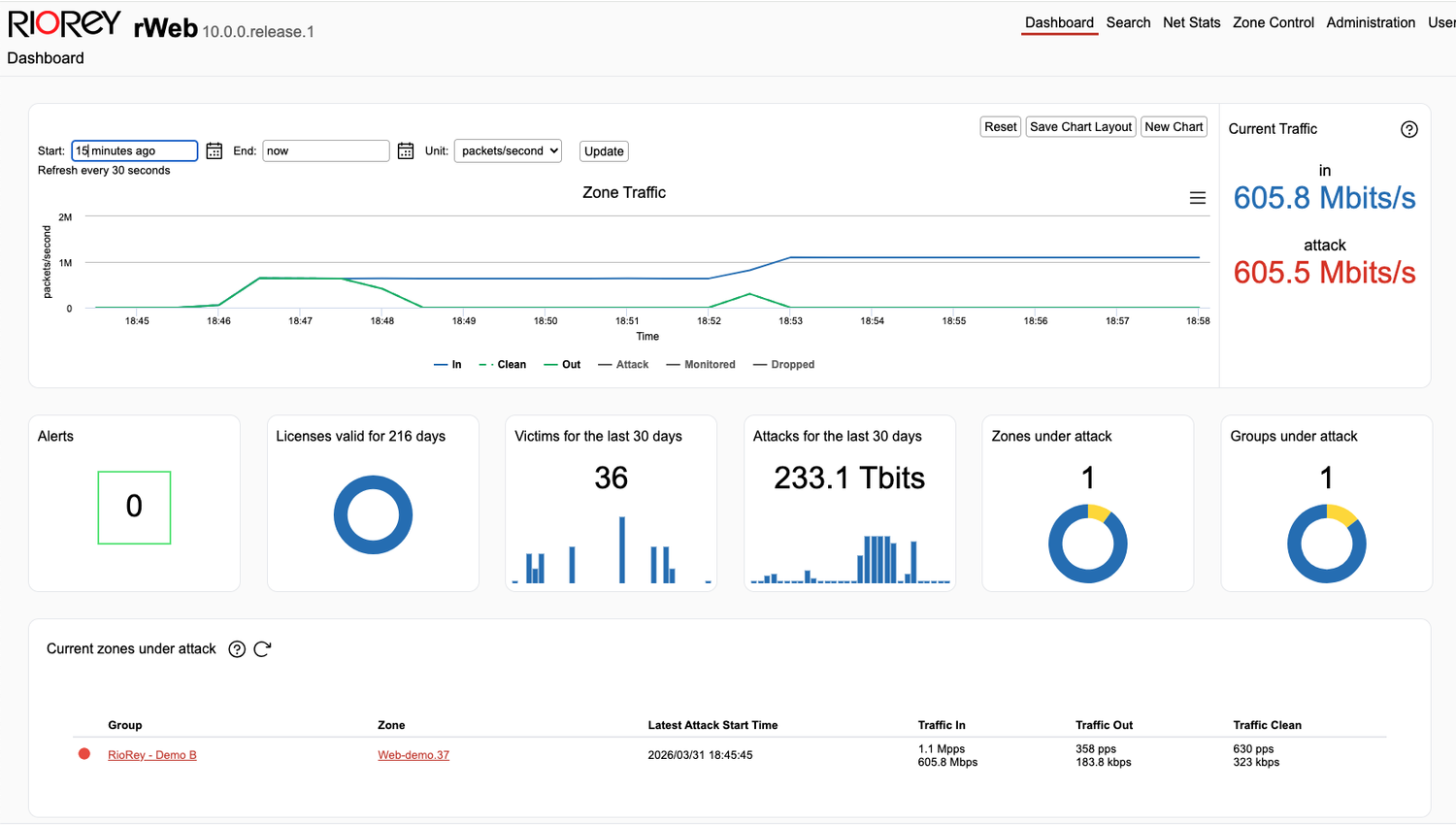
Cloud or on-prem, you have visibility and control. Always.
Whether traffic is being filtered on-premise or scrubbed in rCloud, rWeb shows you everything in the same interface with the same controls.
-
Real-time visibility across both layers
Traffic data, attack detail, and mitigation status are visible in rWeb whether your traffic is being filtered at your edge or scrubbed in rCloud. No summary reports after the fact.
-
Direct mitigation controls during rCloud events
When your traffic is being scrubbed in rCloud you are not waiting for a support ticket. You have direct access to mitigation controls, adjustable in real time, the same way you would on your own hardware.
-
One set of groups and zones across everything
The groups and zones you define in rWeb apply to your RIOS filtering, your Director policies, your customer-facing portals, and your reporting. You can mirror custom local rWeb setting in rCloud.
Ready to talk through your deployment?
We will walk through your network topology and recommend a specific hybrid configuration.
Size your on-premise and rCloud capacity together.
Answer four short questions about your network and we will suggest a starting point: on-premise filtering devices, a RioRey Director license to steer traffic, and an rCloud plan for the attacks that exceed your edge capacity.
What this configurator draws from
Every recommendation above is assembled from the RioRey products below. All of them run the same RIOS filtering analytics and are managed through the same rWeb platform, whether they are deployed as hardware, as virtual machines, or in rCloud scrubbing centers.
- RE10: single 10G interface, up to 6 million packets per second, in-line or off-ramp.
- RS40: up to four 10G interface pairs, up to 40 million packets per second, full high availability design.
- RE100 and RE100/40: QSFP28 interface for 40G or 100G links, up to 80 million packets per second on the full RE100 license.
- RE400: 400G interface platform, coming soon. Contact the team for availability.
- rVM: RIOS filtering as a virtual machine, from 1.5 million to 50 million packets per second, subscription only.
- rCloud: cloud scrubbing with full rWeb visibility and direct mitigation controls, at 12, 24, and 36 month terms.
- RioRey Director: netflow and sflow detection with BGP, FlowSpec, RTBH, and redirection actions, licensed from 10 Gbps to 400 Gbps.
- rWeb: multi-tenant management, zone based mitigation control, and reporting across every deployment.
- RioRey Taxonomy of DDoS Attacks: the 25 attack classes every RioRey deployment covers.